


Food Lion
4.411.44K Reviews
App Specs
- Version
- 9.3.1
- Updated On
- License
- Free
- Downloads
- 1,000,000+
- Developer
- Food Lion, LLC
- Categories
- Shopping
- Platform
- Android, iOS
Screenshots
 Analysis by AppCompare
I judge a grocery app less by how polished its screens look than by whether it helps me make a sensible shopping plan before I reach the store. That is where Food Lion is most useful: it brings the planning side of a Food Lion trip into one place, so I can think through what I need, check offers, and then decide how I want to shop. It is a free shopping app from Food Lion, LLC, and its strongest appeal is to people who already buy groceries at Food Lion or are considering making it part of their routine.
Planning a Food Lion trip from your phone
The app’s practical value comes from joining product search, lists, local offers, and store information in a single shopping workflow. I would not treat it as a universal grocery marketplace; it is specifically a companion to shopping at Food Lion. That focus can be an advantage if you want to plan around that store, while it is a real limitation if your household regularly shops across several unrelated chains and wants one app to manage them all.
It is rated 4.4 on average, with around 39,000 ratings and 11,000 reviews, and has over one million installs. The age rating is Everyone. Those figures suggest that it has reached a sizeable audience, but they do not tell me whether its local offers or shopping options will suit a particular store or household. I’d use the app as a planning aid and still check the details that matter to my actual trip before relying on a deal or an item being available.
Building a list before you leave
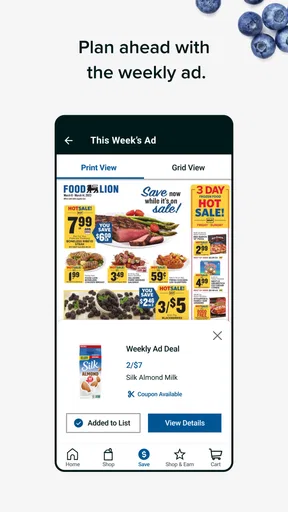
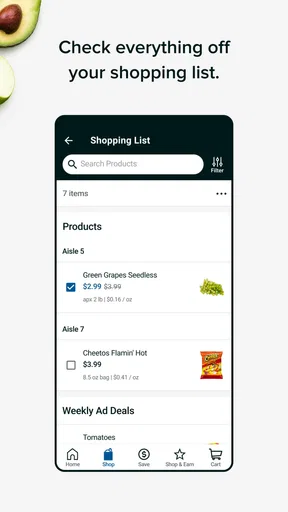
When I’m planning a shop, a useful list is more than a place to jot down groceries. The app lets me add products from search results or weekly flyers, then keep previous lists for another trip. That reuse is especially handy for recurring basics: rather than starting from scratch each week, I can revisit a familiar list and edit it for what has changed. My tip is to treat an old list as a starting point, not an automatic shopping order. Checking what is already in the pantry first helps avoid buying duplicates just because an item appeared on last week’s list.
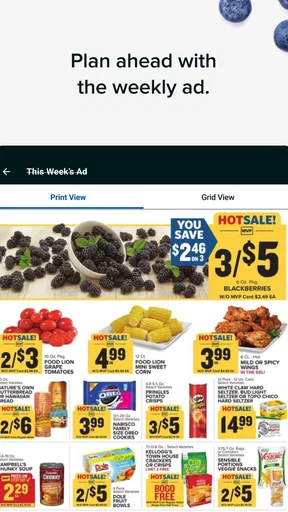
Search and list-building also solve different problems. Search is better when I know the product or type of item I want; browsing a flyer can help when I’m open to adjusting the plan around an offer. I find that distinction useful for avoiding aimless browsing: make a short essentials list first, then look at offers for items you would genuinely use. A discount is not a saving if it sends you home with something you did not need.
Making offers work for your routine
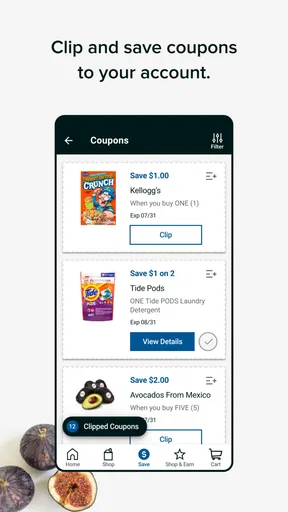
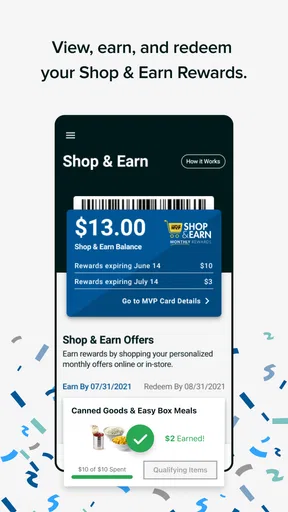
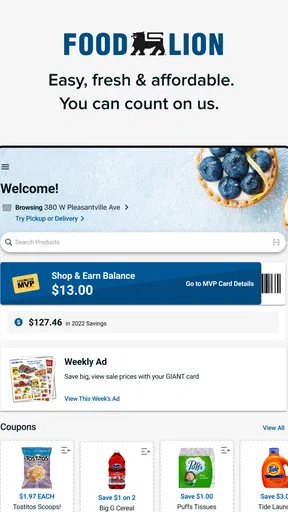
The app includes digital coupons and offers, and it describes a Shop & Earn rewards program for qualifying purchases. This gives regular shoppers a reason to check the app before paying, but I would not assume every offer applies to every item or that every purchase qualifies. The sensible habit is to review the terms shown for an offer and confirm that it matches the product you intend to buy. Linking an MVP Card is part of the app’s savings workflow, so shoppers who already use one may find it more convenient to keep their shopping activity together.
For a realistic example, imagine I’m heading to Food Lion after work to pick up ingredients for dinner and a few household staples. I can check my saved list before leaving, search for anything I forgot to add, and look over relevant coupons while I still have time to change the plan. At the store, I can refer back to the list instead of trying to remember everything. The useful payoff is not a promise that every trip will cost less; it is having fewer separate steps between planning, checking offers, and shopping.
Worth Reading Before You Choose

EA SPORTS FC Mobile 26 Is a Bigger Football Game, but It Takes Time

Flipboard Shows What News Apps Must Do Beyond the Feed

Switching to Android Auto Means Rethinking Your Driving Routine

Google Calendar Makes a Crowded Week Easier to Manage

Ludo King Makes the Most of the Minutes Between Plans

Baby Panda World Brings Quick Play to Modern Phones, but Its Game Library Feels Busy
What the store tools can—and cannot—do
A store locator, store hours, and an aisle guide are practical when I’m making an in-person trip, particularly if I do not visit that location often. The aisle guide can reduce wandering when I’m looking for one specific product, though I would still expect to use ordinary judgment in the store if an item has moved or a guide does not settle the question. Likewise, location helps the app show a nearby store and local deals, but selecting the right store matters: a promotion or store detail is only useful when it applies to the place where I plan to shop.
For shoppers who prefer not to walk the aisles, the app also supports online orders for pickup or delivery. That gives the same planning tool a different role: instead of using the list as a route through the store, you can use it to prepare an order from home. I would choose between pickup, delivery, and an in-person visit based on what is convenient for that particular trip, rather than assuming one option is always best. A quick top-up may be easiest in person, while a planned order can be more comfortable when I want to review items at my own pace.
Who will get the most from it
I’d recommend it first to people who shop at Food Lion often, especially those who like keeping a repeatable list and checking digital offers before they leave home. It can also help an occasional shopper who wants store hours, directions to a location, or a way to browse products before visiting. If you mainly shop at several different grocers, compare their own apps before settling on this one; a retailer-specific tool is naturally less useful when your main need is a shared, chain-neutral list.
The app is on version 9.1.1, and its listed minimum operating system is 8.1. It has been available since January 11, 2017, so it is an established option rather than a brand-new grocery experiment. That history is useful context, but the version number alone does not tell me how the app will behave on every device. If your phone is older, checking compatibility before planning to use it for a time-sensitive order is a sensible precaution.
One trade-off is that a feature-rich retailer app asks you to do a little setup to get the most from it. Choosing a store, linking an MVP Card if you use one, and reviewing offers takes more effort than carrying a paper list. In return, you have the chance to connect those tasks in one place. If you do not want to create an account or manage digital coupons, a basic notes app or a handwritten list may be quicker. The right choice depends on whether Food Lion-specific planning is valuable enough to justify that extra step.
Another practical question is whether you need to use the app every time you shop. I would not. For a tiny trip where I already know exactly what I need, opening a separate app may add friction rather than remove it. It earns its place when I have several items to coordinate, want to reuse a regular list, or need to check a store detail before setting out. That difference between a quick errand and a planned shop is important: the app is most helpful when there is something to organize.
Getting Started with Food Lion
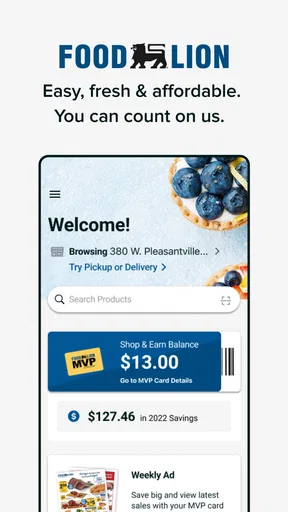
The first thing you'll notice when you download the app is its user-friendly interface. It’s like walking into a well-organized store, but better because you can do it in your pajamas. Setting up your account is straightforward. You’ll be prompted to enter your location, which helps in finding the nearest Food Lion store and displaying local deals. A neat feature is the ability to link your MVP Card, which can rack up savings as you shop. Trust me, who doesn’t love a good bargain?
Shopping Made Easy
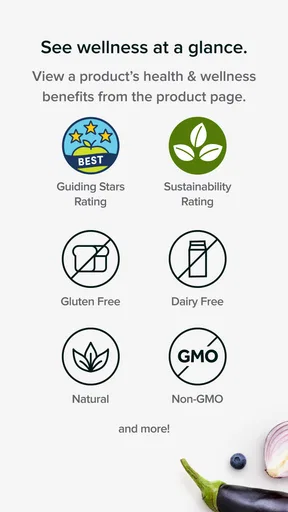
Once you're in, the app offers a seamless shopping experience. The search functionality is robust; you can find products by category, brand, or even dietary preferences. Whether you’re hunting for gluten-free snacks or fresh organic produce, it’s all just a tap away. The app also offers personalized product recommendations based on your shopping habits. It’s like having a personal shopper who knows what you love.
Creating a shopping list is as simple as pie. You can add items directly from the search results or browse through weekly flyers. The app updates your list in real time, so you always know what’s missing from your pantry. Plus, it keeps your previous lists. So, if you’re like me and tend to buy the same stuff every week, you can just reuse your list. Nifty, huh?
Deals and Discounts
Now, let’s talk savings. The app is packed with digital coupons and exclusive offers. One of my favorite features is the “Shop & Earn” program. It’s a rewards system where you can earn points on qualified purchases and redeem them for savings on future shopping trips. The deals are updated regularly, so there’s always something new to snag. Plus, you can easily apply coupons at checkout with just a click. No more fumbling around with paper coupons at the register!
Navigating the Store
For those of us who still enjoy the occasional in-person shopping trip, the app offers a handy store locator and aisle guide. It’s super helpful when you’re trying to find that one elusive item. The app also lets you check store hours and even view the latest COVID-19 protocols, ensuring a safe shopping experience. And if you’re in a hurry, the app supports online orders for pickup or delivery. Just shop from the comfort of your home, and your groceries will be ready when you are.
Customer Service and Support
If you ever run into any hiccups, the app provides excellent customer support options. There’s a detailed FAQ section that covers most queries, and you can contact customer service directly through the app. In my experience, the response time is pretty fast, and the support team is genuinely helpful. They do their best to resolve any issues, making the shopping experience as smooth as possible.
All in all, the Food Lion app is a solid choice for anyone looking to simplify their grocery shopping. From its intuitive design to the plethora of deals, it covers all the bases. Whether you’re a tech-savvy shopper or just dipping your toes into the world of grocery apps, this one is worth a download. Happy shopping, and may your pantry always be full!
Pros
- User-friendly interface for easy navigation.
- Wide variety of grocery options available.
- Exclusive discounts and promotions.
- Efficient online ordering system.
- Loyalty program for regular savings.
Cons
- Limited delivery areas in some regions.
- Occasional app stability issues.
- Limited payment options available.
- No international shipping options.
- Some items may be out of stock.
FAQs for Food Lion
What features does the Food Lion app offer?
The Food Lion app provides a variety of features to enhance your shopping experience. Users can browse weekly ads, create and manage shopping lists, and access personalized deals. The app also offers a rewards program, allowing you to earn and redeem points for discounts. Additionally, you can locate the nearest store and check item availability.
Can I use digital coupons with the Food Lion app?
Yes, the Food Lion app allows you to clip digital coupons directly to your MVP card. Simply browse the available coupons in the app, select the ones you want, and they will be automatically applied at checkout. This feature helps you save money without the hassle of handling paper coupons.
Is the Food Lion app available for both Android and iOS devices?
Absolutely, the Food Lion app is available for download on both Android and iOS devices. You can find it in the Google Play Store for Android users and the Apple App Store for iOS users. Ensure your device meets the necessary requirements for the best experience.
How does the rewards program in the Food Lion app work?
The rewards program in the Food Lion app is designed to offer exclusive benefits to loyal customers. By shopping and using your MVP card, you earn points that can be redeemed for discounts on future purchases. The app keeps track of your points and lets you know when you have enough to redeem.
What should I do if I encounter issues with the Food Lion app?
If you experience any issues with the Food Lion app, there are a few steps you can take. First, check for app updates in your device's app store, as updates often fix bugs. If problems persist, try restarting the app or your device. For further assistance, contact Food Lion's customer support through the app or their website.


